 AINOW
Zoe works where people already ask.
Turn on the channels you need. A request can start on the phone and finish by email, and nobody has to start over.
Zoe in chat
Your website and Microsoft Teams
People get answers on your website and in Microsoft Teams, and the job gets done in the same conversation.
More about ChatIQZoe on the phone
Phone lines and voice on the web
No phone menus. Callers say what they need, and Zoe verifies them and solves it on the call.
More about VoiceIQZoe in the inbox
Shared inboxes
Every email in your shared inboxes gets answered, routed or turned into a ticket, with nobody sorting by hand.
More about InboxIQZoe at work
Across your systems
Bigger jobs like onboarding and refunds get a team of agents, and the work stops for approval where your policy says.
More about AgentIQ
On the desktop, Zoe is one keypress away.
Nobody should have to go and find her. The desktop Companion opens Zoe over whatever is on screen, so the question gets asked the moment it comes up.
- One key, then type or talk
- A hotkey opens a small Zoe window over your work. Press it again and she is out of the way.
- She knows what you're looking at, if you allow it
- When you ask, she can use the title of the window in front of you or the text you selected. The window shows what it is sharing, and one click leaves it out.
- The same Zoe
- The same conversations, memory, agents and approvals as in the browser. You can approve a change without leaving what you are doing.
- Nothing in the background
- She does not listen until you press the key, and records nothing while you work. Her menu lists exactly what the device shares.
Sharing: the title of your active windowLeave it out
What's the fix for this one?
That is INC0049321. The account locked after five failed sign-ins from an old phone session. I can unlock it and sign out the old sessions.
Example window. Illustrative.
When a request needs more, Zoe spins up a team.
Some jobs touch several systems at once. Zoe splits the work across AI agents, runs them together and brings back one answer, so the person asking only ever talks to Zoe.
Illustrative example. Each agent can only use the tools you give it, and high-risk changes still wait for approval.
"My new hire, Sam, starts Monday. Can you get him set up?"
Zoe splits it into four parts and starts them together.
 Done
 Done
 DoneNeeds approval
Helpful, and always within your rules.
Zoe works inside the rules your security and compliance teams already set.
- Remembers only what you confirm
- When Zoe learns something worth keeping, she asks first. People can see, edit or clear what she knows about them.
- Answers from your own content
- She searches the knowledge bases you allow, and shows where each answer came from.
- Calls in the right agents
- For bigger jobs Zoe spins up agents you set up, each with its own tools, then brings back the answer and shows who helped.
- Asks before anything high-risk
- Looking things up needs no sign-off. Changes follow your policy, and high-risk ones wait for a person to approve.
- Wears your brand
- Zoe takes on your colours and logo in chat, on the web and in Teams.
- Keeps the record
- Every request, check, change and approval lands in the audit log, whichever channel it came from.
One assistant, from the first email to the last report.
An example day with Zoe at a mid-sized organization.
Illustrative example.
- Email
Sorted 46 overnight emails: 5 urgent to Billing, 12 answered, 3 tickets opened.
- Phone
Took a call from a locked-out employee, verified them and got them back in within 2 minutes 14 seconds.
- Chat
Changed a delivery address in Salesforce, right from the website chat.
- Agent team
Set up accounts, laptops and access for three new hires, and held admin access for approval.
- Zoe
Sent the team a summary of the day: what was resolved, what is waiting, and why.
You can see everything Zoe does.
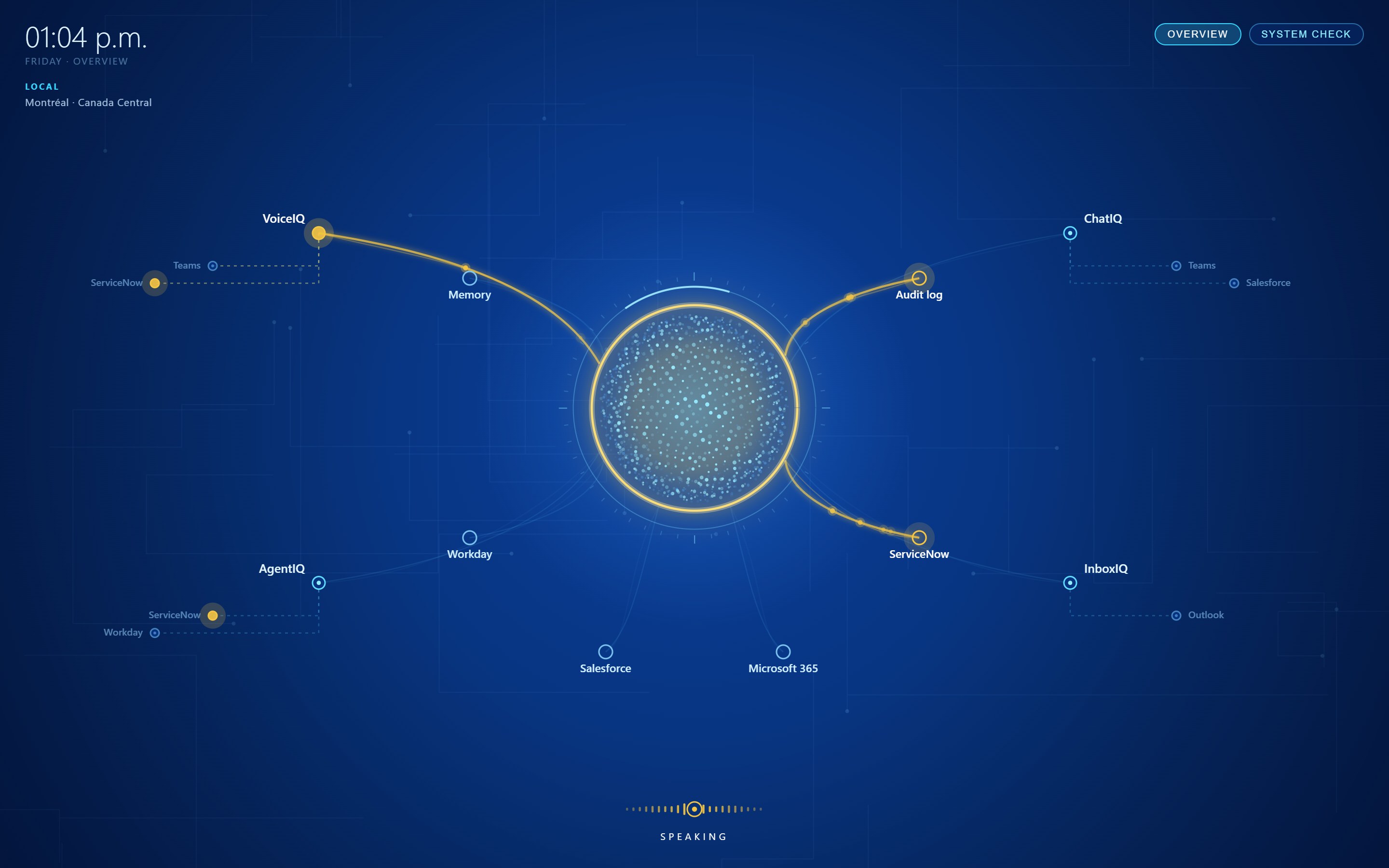
Every action follows your rules and lands in one record, with your data hosted in Canada or the region you need. The AI Command Center watches Zoe, her agents and every other AI in your organization.
Questions about Zoe.
Is Zoe just a chatbot?
No. A chatbot answers questions. Zoe holds a real conversation: she asks a follow-up question when something is missing, guides people to what they need and suggests a next step. Then she finishes the request: she updates the record, opens the ticket or books the time off, and tells you it is done.
Do we need to replace our systems?
No. Zoe works with the systems you already use, like ServiceNow, Microsoft 365 and Salesforce, and your team keeps the tools it knows.
Is Zoe one product or several?
One. Zoe is the assistant your people and customers talk to. ChatIQ, VoiceIQ, InboxIQ and AgentIQ are her features for chat, the phone, the shared inbox and multi-step work, and you turn on the ones you need.
Can Zoe carry our brand?
Yes. Zoe takes on your colours and logo in every channel.
Which languages does Zoe speak?
English and French on every channel. On the phone she answers callers in many more languages, and switches when the caller does.
Can Zoe get around the permissions in our systems?
No. Zoe does not create new access. In ServiceNow, Workday, Salesforce and the other systems you connect, she works with the permissions the person asking already has. If they can't see something themselves, Zoe won't fetch it for them.
What can Zoe do without asking?
Only what your policy allows. Every tool has a risk level, high-risk changes wait for approval, and each agent can only use the tools you give it.
Does the desktop Companion watch what I do?
No. It does nothing until you press its key. It shares the window title or your selected text only when you ask a question, only what your organization allows, and it shows you what it is sharing first.
Does Zoe remember everything?
No. She proposes what to remember and saves it only after you confirm. People can review and delete what she knows about them.